

30+ caption styles, burned-in MP4, seven subtitle formats and transcripts, shared workspaces with comments and approvals, a REST API and Zapier. Whatever you ship, Fluen has the right way out.
Start from 30+ ready-made styles, static or animated, including dynamic word-by-word captions. Fine-tune the font, colours, outline, plate and motion, then save the look so your whole team can use it. The workspace owner picks the default style every new video starts with.
Drag-and-snap positioning, per-cue alignment overrides, and a safe zone for vertical video make placement a visual decision rather than a numbers game.
Dive into caption styling
Your caption style is rendered into the picture exactly as it looks in the editor, word-by-word animation included (frosted "blur behind" plates are the one exception for now). Pick 4K, 1080p or 720p; non-standard sources can also keep their original size. Vertical, square, widescreen, ultra-wide: caption sizing adapts so the result looks right on every frame.
Right-to-left languages render with correct directionality. The output is ready to upload anywhere, no extra processing. Burned-in export is available on paid plans.
See the burn-in deep diveWhatever your editor, player, or broadcast spec asks for, Fluen exports the right format. Each one built to its standard, not a generic approximation.
Need to shift every cue by a few seconds before delivering? Apply a timing offset right at export, no editor pass required. Useful when the deliverable expects a specific lead-in or the source has a slate at the head. Downloads and exports are included in every paid plan.
Create as many workspaces as you need (one per client, one per show, one per department). Each has its own files, its own members, its own Subtitle Defaults and its own caption styles.
Owners control membership, permissions and billing; collaborators upload, review, edit, and export within the workspaces they're invited to. Generate a share link with automatic 72-hour expiry to put work in front of a client without giving them an account. Set it to Can view, or Can comment if you want their notes back.
Dive into collaboration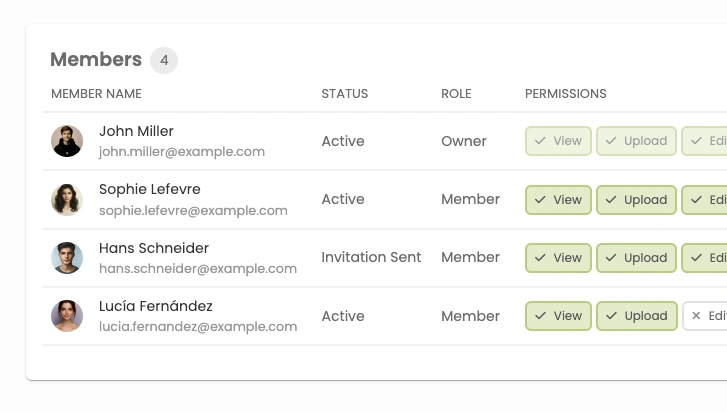
Tell Fluen exactly how brand names, technical terms, and people's names should appear. Build the glossary once and the spelling stays consistent across transcription, translation, and every export.
Bulk-import hundreds of terms from a CSV. Add new entries while you upload, the moment you spot one. Pair entries across languages so a German "Künstliche Intelligenz" maps to your preferred English rendering, every time.
See the glossary in actionMaybe you prefer one line per caption instead of two. Maybe you want a few more characters per line, or a slightly slower reading pace than the default. Reprocessing re-flows the captions in seconds with your new preferences applied.
The audio doesn't have to be transcribed again. Your translated tracks don't have to be translated again. Just the layout changes, with no new charges and no waiting for the upload to process from scratch.
See how reprocessing worksGenerate API tokens, upload files programmatically, trigger captioning and translation jobs, and download results. Run Fluen from your own infrastructure as part of a larger workflow.
View the API docsFluen is also on Zapier, so the same triggers and actions reach 9,000+ apps without writing any code. Every plan can create an API key, the free one included.
See the Zapier integrationWorking in an edit suite instead? The Fluen plugin for Adobe Premiere Pro brings captioning and translation right into your timeline.
See the Premiere Pro plugincurl -X POST https://studio.fluen.ai/api/v1/media \
-H "Authorization: Bearer YOUR_API_TOKEN" \
-H "Content-Type: application/json" \
-d '{
"file_url": "https://example.com/video.mp4",
"source_language": "en",
"translate_to": ["es", "de", "fr"]
}'Two more places to go next, depending on where you start.
Upload your first file free. No credit card, no commitment.
Feedback Where the Subtitles Are
Comment on a single subtitle or on the whole track, reply, and resolve the thread when it's settled. Comments stay on their line through retiming and reprocessing, and clients can join from a share link without an account. On every plan, including Free.
Team plans add a formal review: one named reviewer per language, each with a private link valid 7 days. They comment, suggest wording you accept in one click, then approve or request changes. Each language is approved separately.
See comments and approvals