

Upload any video or audio file and get accurate, well-timed captions in minutes. Fine-tune in our built-in editor, then export as SRT, VTT, TTML, SBV, and more.
No credit card required · Try it free










Fluen regularly benchmarks five leading speech engines (ElevenLabs, Speechmatics, Deepgram, AssemblyAI and OpenAI) and sends each language to the one that handles it best.
Captions are split at natural sentence boundaries with proper character-per-line limits for readability.
Turn on speaker labels when you upload and Fluen detects every distinct voice in interviews, podcasts, and multi-person recordings. Choose name labels ([Speaker Name] in subtitle files) or dashes, then rename or reassign speakers in the editor before you export.
Define how technical terms, brand names, and jargon should appear in your captions. The AI respects your glossary.
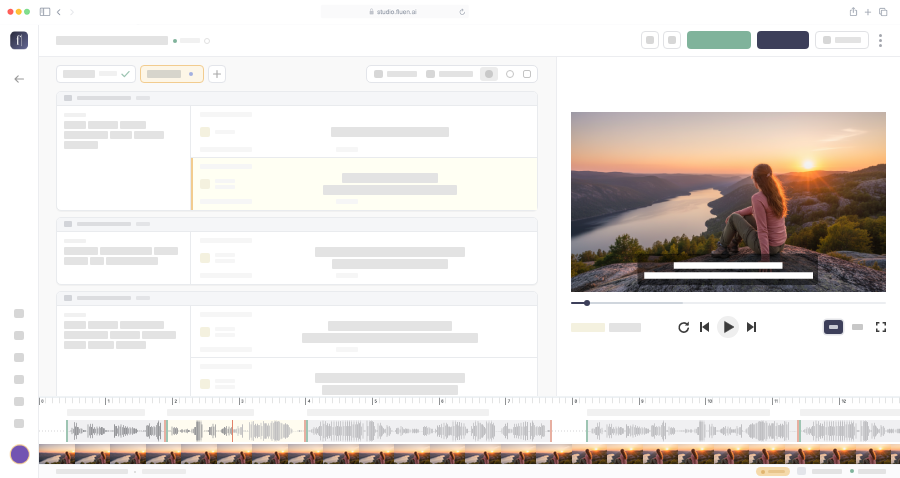
Choose from 30+ caption styles, including dynamic word-by-word captions, or fine-tune font, color, outline, and background. Save styles for your whole team, then export burned-in MP4s up to 4K.
See dynamic captionsUpload up to 50 files at a time on paid plans, or import them from Google Drive or Dropbox. Fluen processes them in the background, and our Zapier integration can start new jobs automatically.

Boost discoverability and watch time with accurate captions. YouTube rewards accessible content in search and recommendations.
Turn episodes into searchable transcripts and video clips with captions. Repurpose audio content for social media.

Deliver broadcast-quality subtitle files in industry-standard formats. Editing in Premiere Pro? Caption and translate inside your timeline with the Fluen plugin.
Use AI-generated captions as a high-quality starting point. Your team reviews and refines: faster turnaround, lower cost.

Make courses accessible and compliant. Subtitles improve retention and help non-native speakers follow along.
Caption town halls, training videos, and internal comms. Ensure your message reaches every employee, everywhere.
Fluen can also translate your captions into 50+ languages with production-ready formatting.
Fluen achieves up to 99.4% accuracy. We regularly benchmark five leading speech engines and route each language to the one that handles it best, so you're not locked into a single AI. Our own segmentation then splits captions at natural sentence boundaries, with proper punctuation and capitalization.
Fluen supports all major video formats including MP4, MOV, MKV, and AVI, as well as audio formats like MP3, WAV, M4A, and FLAC. You can upload from your computer or import from Google Drive or Dropbox. Already have subtitles? On paid plans you can import your own SRT files during caption review, or in bulk for many videos at once. A source video is still required.
You can export captions in 7 subtitle formats (SRT, WebVTT, TTML, SBV, ITT, EBU STL, and SSA), as a burned-in MP4 up to 4K with your caption style, or as a TXT, Word, or PDF transcript. Exports are included in all paid plans.
Most files are processed in minutes. A 60-minute video typically takes 3–5 minutes to transcribe. Processing time depends on file length, audio quality, and the AI engine selected. You'll be notified as soon as your captions are ready for review.
Yes. Pick one of 30+ caption styles, including animated word-by-word presets, or fine-tune font, color, size, outline, shadow, and background, and drag captions into place on the video. Styles can be saved and shared with your team. In the editor you can also adjust timing and text, and set subtitle limits such as max characters per line and max lines per subtitle.
Yes. Speaker labels are off by default: turn them on when you upload, or set them as a workspace default, and Fluen detects every distinct voice in your file using an industry-leading speaker recognition model. Choose name labels, written as [Speaker Name] in subtitle files and drawn as a label by your caption style, or classic dash markers. You can rename or reassign speakers in the editor before exporting. Especially useful for interviews, podcasts, and panel discussions.
Absolutely. Once you've generated and reviewed your captions, you can translate them into 50+ languages with Fluen's AI translation engine. Translations are context-aware and automatically re-segmented for each target language. Learn more about subtitle translation →
Yes. Fluen works with any aspect ratio, including vertical 9:16 videos from TikTok, Instagram Reels, and YouTube Shorts. Captioning and burned-in export both handle portrait orientation automatically, so your subtitles are always positioned correctly.
Yes. The free plan lets you caption and translate 3 files (up to 90 minutes each) and review the results in the editor, no credit card required. Downloading subtitles, exporting video and importing your own SRT files require a paid plan. See pricing →
Upload your first file free. No credit card, no commitment, no waiting.
Or compare plans