

Upload your video in any of 50+ languages, translate your subtitles to English with context-aware AI, and export production-ready files. No meaning lost, no awkward phrasing.
No credit card required · Try it free





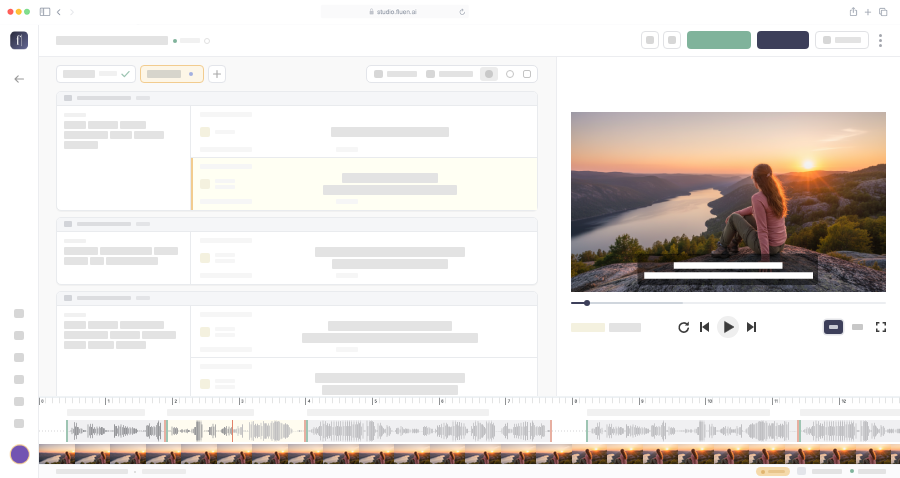
Generic tools translate word-by-word and dump raw text into your subtitle file. Fluen translates in context, then refines across multiple layers to deliver English subtitles that read naturally.
Your source audio goes to the speech engine that handles its language best, chosen from five leading engines, so the English translation starts from an accurate transcript.
Full paragraphs are translated together with the best frontier AI models for English, not cue by cue. This preserves meaning, tone, and idiomatic flow across subtitle boundaries.
Translated text is re-segmented for English subtitle standards by default: 42 CPL, natural line breaks, proper reading speed. All parameters are fully customizable.
Your Glossary entries are respected. Names, brands, and technical terms are handled exactly as you specify. Punctuation and capitalization follow English conventions.
See how Fluen's multi-layer approach produces English subtitles that flow naturally, with proper segmentation and formatting.
Upload your video and Fluen auto-detects the source language. No manual setup.
Generate source-language captions, then translate to English with a single click.
Have a whole content library? Upload up to 50 files at a time on paid plans, or import them from Google Drive or Dropbox.

Drop in your video or audio file in any language. Fluen auto-detects the source language and generates accurate captions. Already have an SRT? On paid plans you can import it during caption review (the source video is still needed).
Review the source-language captions, then translate to English with one click. Add Glossary entries for names, brands, and terms that need specific handling.
Preview your English subtitles synced to the video. Fine-tune anything in our built-in editor. Export as SRT, VTT, TTML, SBV, and more, or as a Word or PDF transcript.






Your source audio is transcribed by the speech engine that handles its language best, chosen from five leading engines. Translations into English come from the best of the latest frontier AI models. The result is English output that captures meaning, tone, and nuance, not just words.
50+ source languages supported · New languages added regularly
Subtitle your content library for English-speaking markets. Deliver broadcast-quality English subtitle files for streaming platforms, international distribution, and licensing.
Make training content accessible across your organization in English. Use Glossary to ensure consistent translation of internal terminology and product names.
Use AI-generated English drafts as a starting point for your linguists. Cut turnaround from days to hours while maintaining the quality your clients expect. On the Team plan, reviewers can comment, suggest wording, and approve each language through a private link.
Prepare your films and documentaries for English-speaking audiences — festivals, VOD platforms, theatrical distribution. Production-ready SRT files that meet industry standards.
Fluen uses models from OpenAI, Anthropic, Google and DeepL, chosen according to the target language, and then does a lot of its own post-processing, correcting and automatically rephrasing lines so the English reads naturally while keeping the original meaning. Full paragraphs of context are translated together, not individual cues, to produce natural English phrasing. The output is then re-segmented to professional subtitle standards (max 42 characters per line, proper reading speed). Most users find the English output needs little to no editing.
Fluen supports 50+ source languages including Spanish, French, German, Portuguese, Japanese, Chinese, Korean, Arabic, Italian, Dutch, Russian, Polish, Turkish, Hindi, Swedish, and many more. The AI auto-detects your source language on upload. View all supported languages →
Yes, on paid plans. Upload the video, then import your SRT during the caption review step (a source video is required). You can also bulk-import SRTs for many videos at once. Fluen then translates them to English with the same multi-layer refinement process: context-aware translation, re-segmentation, and Glossary support.
Fluen includes a Glossary feature that lets you define exactly how specific terms should appear in the English output. Names, brand names, acronyms, and technical vocabulary can be kept as-is or translated to your preferred English equivalent. The AI respects your Glossary entries consistently across all subtitle cues.
Most videos are processed in minutes. A typical 60-minute video takes about 3–5 minutes for captioning and translation combined. The translation step itself is near-instant. You can also batch-process multiple files simultaneously.
Fluen supports 7 subtitle formats (SRT, WebVTT, TTML, SBV, ITT, STL, and SSA), burned-in MP4 up to 4K in your caption style, and TXT, Word, or PDF transcripts. For broadcast and streaming platforms, SRT and WebVTT are the most common. The burned-in MP4 option lets you embed styled English subtitles directly into the video.
Yes. Fluen's English output follows professional subtitle specifications: max 42 characters per line, max 2 lines per cue, appropriate reading speed, and natural line breaks at clause boundaries. These specs are customizable per workspace, so you can match your specific broadcast or platform requirements.
Yes. The free plan lets you caption and translate 3 files (up to 90 minutes each, into up to 3 languages per file) and review the results in the editor, no credit card required. Downloading subtitles, exporting video and importing your own SRT files require a paid plan. See pricing →
Upload your first file free. No credit card, no commitment.
Compare plans